> ## Documentation Index
> Fetch the complete documentation index at: https://docs.hunch.dev/llms.txt
> Use this file to discover all available pages before exploring further.
# Google Drive
> Connect your Google Drive to Hunch
This guide will help you connect your Google Drive to Hunch in just a few minutes using a simple OAuth flow.
***
## ✅ What You'll Need
* **Google Account** with Google Drive access
* **Permission** to authorize third-party applications
***
## 1️⃣ Connect Your Google Drive
This is a simple OAuth integration that requires just a few clicks:
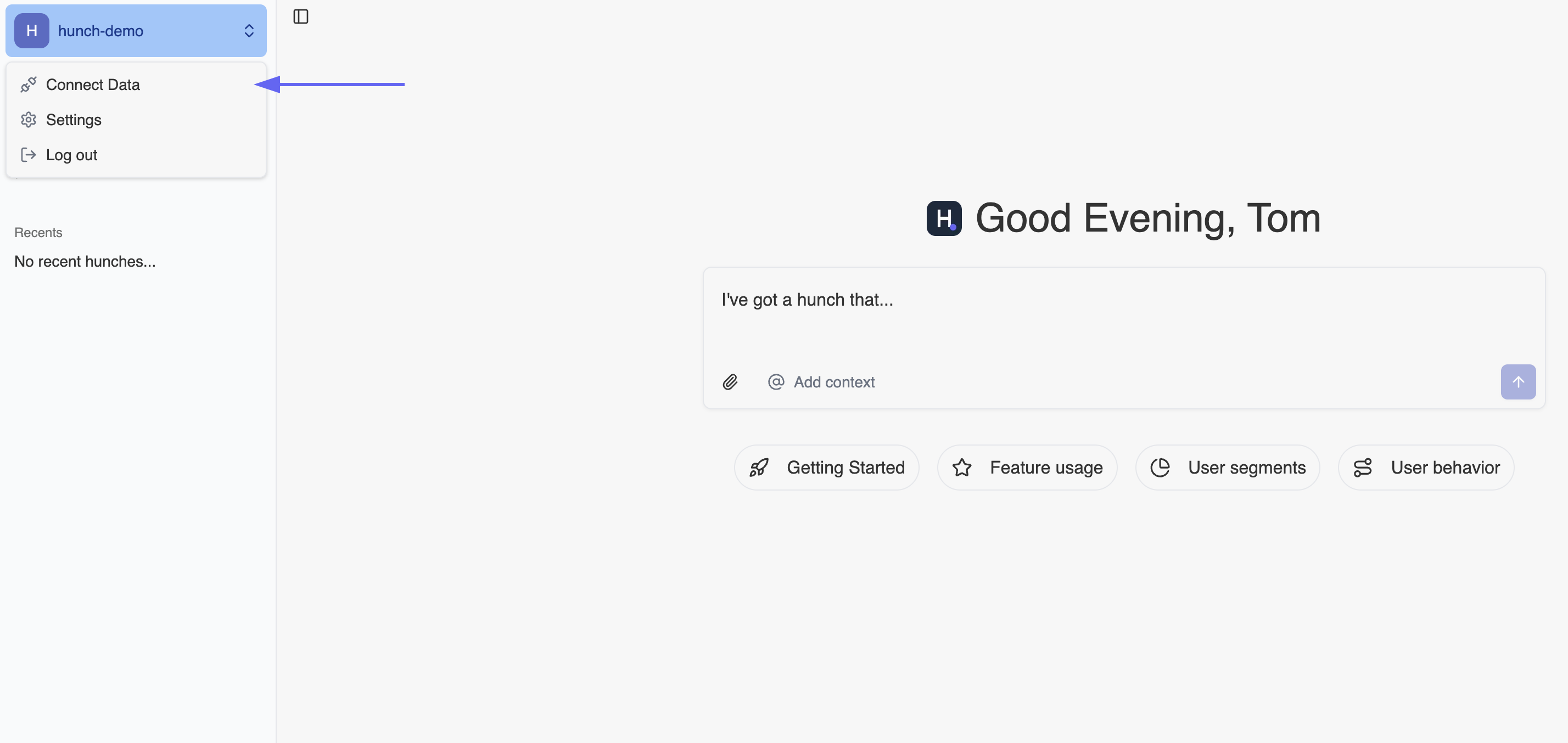
### Step 1: Navigate to Hunch
1. Go to [app.hunch.dev](https://app.hunch.dev)
2. Click on the **Hunch logo** at the top-left corner
3. Select **"Connect your data"**
 ### Step 2: Configure Google Drive Integration
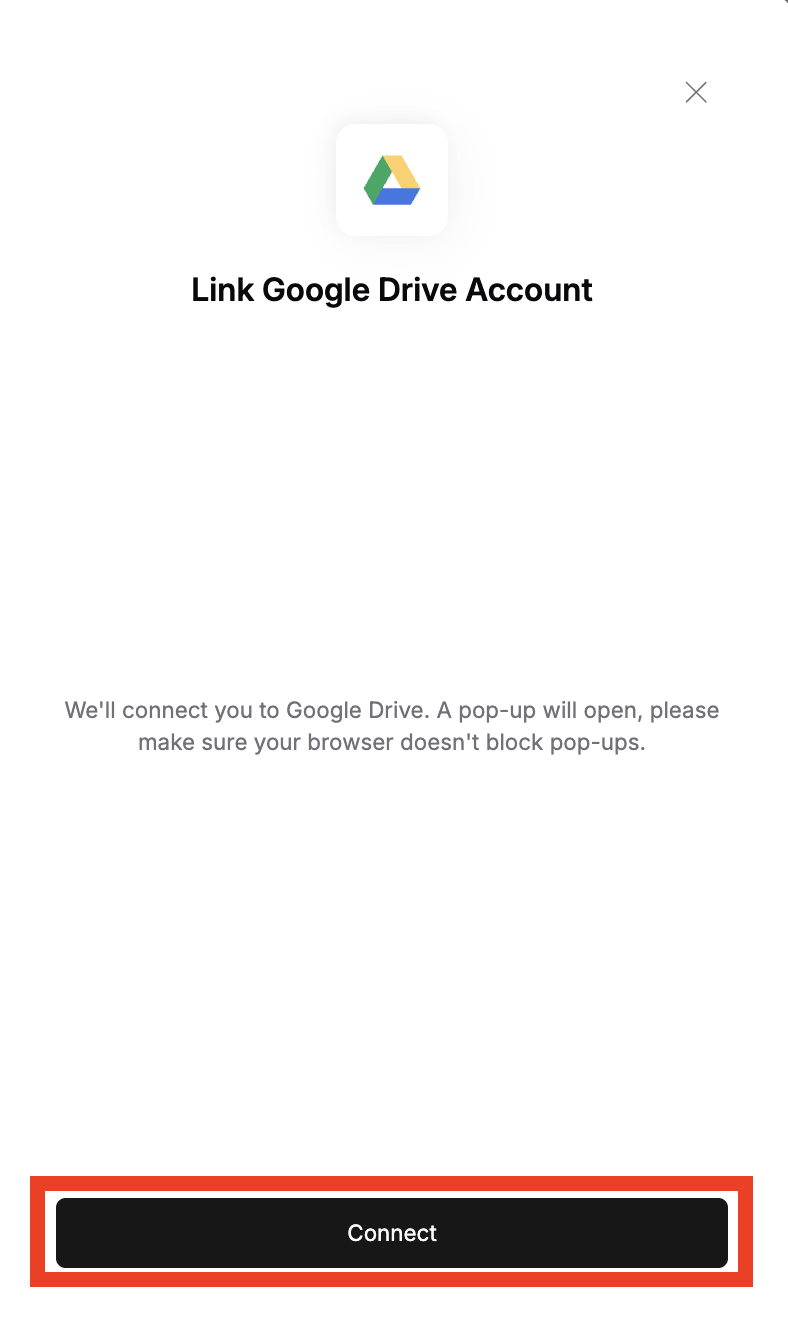
1. Find the **Google Drive** service and click **"Configure"** next to it
### Step 2: Configure Google Drive Integration
1. Find the **Google Drive** service and click **"Configure"** next to it
 2. Click **"Connect"** on the redirected page
 ### Step 3: Authorize Access
1. **Choose your Google account** that you want to give Hunch access to
2. Click **"Allow"** to grant Hunch permission to access your Google Drive
***
## 🎉 You're All Set!
That's it! Your Google Drive is now connected to Hunch.
**What you can do now:**
* Ask Hunch to list directories and files from your Google Drive
* Request analysis of CSV files stored in your Drive
* Get help with Word documents and other files in your Drive
* Search through your Drive content using natural language
You can now ask our agent to search your Drive and help you analyze files you have stored there!
***
## 🚨 Troubleshooting
### Common Issues
**OAuth Authorization Failed**
* Make sure you're logged into the correct Google account
* Check that your Google account has access to Google Drive
* Ensure pop-ups are not blocked in your browser
* Try using an incognito/private browsing window if you have multiple Google accounts
**Permission Issues**
* Verify that you clicked "Allow" during the OAuth flow
* Check that your Google account has the necessary Drive permissions
* If you accidentally clicked "Deny", you'll need to restart the connection process
**Connection Not Working**
* Try disconnecting and reconnecting your Google Drive
* Clear your browser cache and cookies for both Hunch and Google
* Ensure you have a stable internet connection during the OAuth process
**Access Revoked**
* You can manage connected apps in your [Google Account settings](https://myaccount.google.com/permissions)
* If you revoke access from Google's side, you'll need to reconnect through Hunch
***
## 📞 Need Help?
If you encounter any issues during setup, our support team is here to help:
* **Email**: [support@hunch.dev](mailto:support@hunch.dev)
* **Slack Community**: [Join our Slack](https://join.slack.com/t/hunchdevcommunity/shared_invite/zt-38sihc6ph-zwQUOA4OD5TUIdDXxpjK0w)
We typically respond within a few hours during business hours.
### Step 3: Authorize Access
1. **Choose your Google account** that you want to give Hunch access to
2. Click **"Allow"** to grant Hunch permission to access your Google Drive
***
## 🎉 You're All Set!
That's it! Your Google Drive is now connected to Hunch.
**What you can do now:**
* Ask Hunch to list directories and files from your Google Drive
* Request analysis of CSV files stored in your Drive
* Get help with Word documents and other files in your Drive
* Search through your Drive content using natural language
You can now ask our agent to search your Drive and help you analyze files you have stored there!
***
## 🚨 Troubleshooting
### Common Issues
**OAuth Authorization Failed**
* Make sure you're logged into the correct Google account
* Check that your Google account has access to Google Drive
* Ensure pop-ups are not blocked in your browser
* Try using an incognito/private browsing window if you have multiple Google accounts
**Permission Issues**
* Verify that you clicked "Allow" during the OAuth flow
* Check that your Google account has the necessary Drive permissions
* If you accidentally clicked "Deny", you'll need to restart the connection process
**Connection Not Working**
* Try disconnecting and reconnecting your Google Drive
* Clear your browser cache and cookies for both Hunch and Google
* Ensure you have a stable internet connection during the OAuth process
**Access Revoked**
* You can manage connected apps in your [Google Account settings](https://myaccount.google.com/permissions)
* If you revoke access from Google's side, you'll need to reconnect through Hunch
***
## 📞 Need Help?
If you encounter any issues during setup, our support team is here to help:
* **Email**: [support@hunch.dev](mailto:support@hunch.dev)
* **Slack Community**: [Join our Slack](https://join.slack.com/t/hunchdevcommunity/shared_invite/zt-38sihc6ph-zwQUOA4OD5TUIdDXxpjK0w)
We typically respond within a few hours during business hours.